
 Custom Websites
 Custom Logo Design
 Video Animation
 Expert SEO Services
 WP Support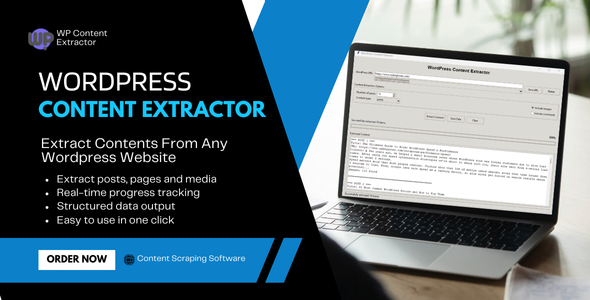
WordPress Content Extractor – Professional Desktop Application
$31.00
Transform Any WordPress Website into Structured Data
WordPress Content Extractor is a powerful, professional-grade desktop application that allows you to extract, analyze, and export content from any WordPress website with ease. Whether you’re a content researcher, digital marketer, SEO specialist, or data analyst, this tool provides everything you need to gather comprehensive content data from WordPress sites.
Key Features & Benefits
Comprehensive Content Extraction
Extract Posts & Pages: Get complete content from blog posts, articles, and static pages
Full Text Content: Extract complete article text, not just excerpts
Metadata Extraction: Capture titles, dates, authors, categories, and tags
Image URLs: Extract all image links with full URLs
Comments Support: Optional extraction of user comments
Smart Content Detection: Automatically identifies and extracts relevant content
Advanced Technical Features
WordPress REST API Integration: Uses official WordPress API for clean, structured data
Intelligent Fallback: Automatically switches to web scraping when API is unavailable
Progress Tracking: Real-time progress bar with percentage completion
Multi-threaded Processing: Non-blocking extraction for smooth user experience
Error Handling: Robust error recovery and user-friendly error messages
URL Management: Save and manage frequently used WordPress URLs
Multiple Export Formats
JSON Export: Perfect for developers and data analysis
CSV Export: Ideal for spreadsheet applications and reporting
TXT Export: Human-readable format for documentation
Structured Data: Clean, organized output with all metadata
Professional User Interface
Modern GUI: Clean, intuitive interface
Real-time Updates: Live progress tracking and status updates
Responsive Design: Adapts to different screen sizes
User-friendly: No technical knowledge required
Perfect For
Content Marketers & SEO Specialists
Analyze competitor content strategies
Extract content ideas and topics
Research trending topics in your niche
Gather content for inspiration and analysis
Data Analysts & Researchers
Collect structured data from WordPress sites
Analyze content patterns and trends
Export data for further analysis
Create comprehensive content databases
Digital Agencies
Client content audits
Competitor analysis reports
Content gap analysis
Market research and insights
Bloggers & Content Creators
Research popular content topics
Analyze successful posts
Gather inspiration for new content
Study content structure and formatting
Performance
Extraction Speed: 50-500 posts per minute (depending on site)
Memory Usage: Low memory footprint
Concurrent Processing: Multi-threaded for optimal performance
Error Recovery: Automatic retry and fallback mechanisms
How It Works
Step 1: Enter WordPress URL
Simply enter any WordPress website URL (e.g., https://example.com or example.com)
Step 2: Configure Extraction Settings
Number of Items: Set how many posts/pages to extract (1-1000)
Content Type: Choose posts, pages, or both
Include Images: Option to extract image URLs
Include Comments: Option to extract user comments
Step 3: Start Extraction
Click “Extract Content” and watch the real-time progress bar
Step 4: Export Data
Save your extracted content in JSON, CSV, or TXT format
| Application Runtime | Native |
|---|---|
| Demo Url | |
| High Resolution | Yes |
| Operating System Versions | Windows 11, Windows 10, Windows 8 Desktop, Windows 7 |
| Video Preview Resolution |
Only logged in customers who have purchased this product may leave a review.







.png)

Reviews
There are no reviews yet.