
 Custom Websites
 Custom Logo Design
 Video Animation
 Expert SEO Services
 WP Support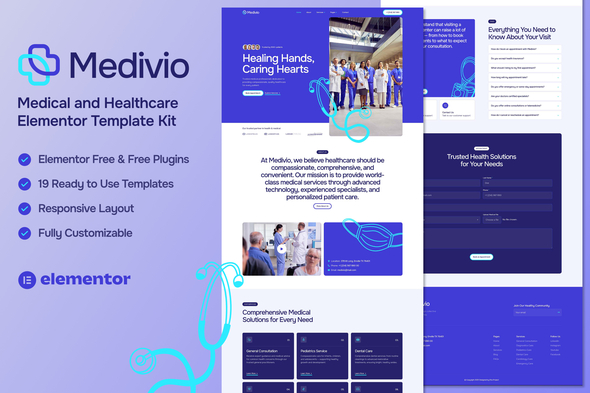
Medivio – Medical & Healthcare Elementor Template Kit
$24.00
Medivio – Medical & Healthcare Elementor Template Kit (NOT A WordPress Theme) is a clean, modern, and professional Elementor Template Kit carefully crafted for hospitals, clinics, doctors, healthcare providers, and medical professionals. Designed with precision and empathy, Medivio helps you create a trustworthy online presence that inspires confidence and care — without writing a single line of code.
Medivio Template Kit includes stunning carefully crafted 14 Pages and 19 Stunning Templates, you can build your professional-looking website just a click away.
Features
- Using Free Elementor (Elementor Pro is not required)
- 13 Ready to Use Pages
- 18 Ready to Use Templates
- 100% Responsive & Retina Ready
- Modern, clean & professional design
- Fully customizable in Elementor
- No coding required
- Built with free Elementor and free Plugins
- SEO-friendly layout structure
- Global color & typography controls
- Fast-loading, lightweight design
- Cross-browser compatible
Templates Include
- Global Theme Style
- Home
- About
- Services
- Service Detail
- Appointment
- Career
- Testimonials
- FAQs
- Team
- Pricing
- Blog
- Single Post
- Contact
- 404 Page
- Header
- Footer
- Form Contact
- Form Newsletter
- Form Appointment
Required Plugin
- Elementor
- Jeg Kit for Elementor
- MetForm
How to Use Template Kits:
This is not a WordPress Theme. Template kits contain the design data for Elementor only and are installed using the envato Template Kit Import plugin for WordPress or directly through Elementor.
Detailed Guide:
For further support, go to Elementor > Get Help in WordPress menu.
How to Import Metforms
- If you have Elementor Pro, skip install of Metform and form blocks.
- Import the metform block templates
- Import the page template where the form appears and right-click to enable the Navigator
- Locate and select the Metform widget and click Edit Form. Choose New, then Edit Form. The builder will appear
- Click ‘Add Template’ grey folder icon.
- Click ‘My Templates’ tab.
- Choose your imported metform template, then click ‘Insert’ (click No for page settings).
- Once the template is loaded, make any desired customizations and click ‘Update & Close’ The form will appear in the template
- Click Update
How to Setup Header in Jeg Elementor Kit Plugin
If you have Elementor Pro, headers and footers may be customized under Theme Builder.
- Go to Jeg Elementor Kit menu item > Header Template
- Click Add New Header
- Add condition > All Site and click Create
- Click gray folder icon to access My Templates tab
- Insert the header template.
- Customize and Save.
- Repeat for Footer and 404 Page
- If you have Elementor Pro, headers and footers are customized under Templates > Theme Builder.
Make Sure You Have Enabled ‘Flexbox Container’
- In the Dashboard go to Elementor > Settings > Features
- Go to ElementsKit > Header Footer select Header and click Add New
- Scroll down until you find ‘Flexbox Container’ > Active
Detailed Guide:
For further support, go to Elementor > Get Help in WordPress menu.
Notes
This Template Kit uses demo images from Envato Elements. You will need to license these images from Envato Elements to use them on your website, or you can substitute them with your own.
| Demo Url | https://rre Project.site/medivio/ |
|---|---|
| Template Kit Certified | No |
| Template Kit Requires | |
| Template Kit Software Version | Elementor 3.10.x |
| Template Kit Type | Envato Template Kit |
Only logged in customers who have purchased this product may leave a review.









Reviews
There are no reviews yet.